- Before you start
- Setup steps
- Install driver or software
- Install ribbon
- Load cards
- Print first test card
- How to use the printer
- Troubleshooting or common issues
- Frequently Asked Questions
- What types of cards can the Evolis Primacy 2 print?
- Is the Cardpresso software included for free?
- How do I know when to change the ribbon?
- What is the unique printhead protection feature?
- Can the Evolis Primacy 2 print on both sides of a card?
- Are the printed cards durable for long-term use?
- Related products
✨ Featured Products

Evolis Primacy 2 Card Printer Full SETUP With 200 Dark Print Cards & Full Panel Ribbon/Ink + 📞Support & Installation

Evolis Primacy 2️⃣ YMCKO 300 Impressions Thermal Ribbon (Full Panel) - 1 Roll Colour Ribbon
Evolis Primacy 2️⃣ YMCKO 300 Impressions Thermal Ribbon (Full Panel) - 1 Roll Colour Ribbon

Evolis Primacy 1️⃣ YMCKO 300 Impressions Thermal Ribbon (Full Panel) - 1 Roll Colour Ribbon
Evolis Primacy 2: How to Use & Is It Right For You?
Evolis Primacy 2: How to Use & Is It Right For You?
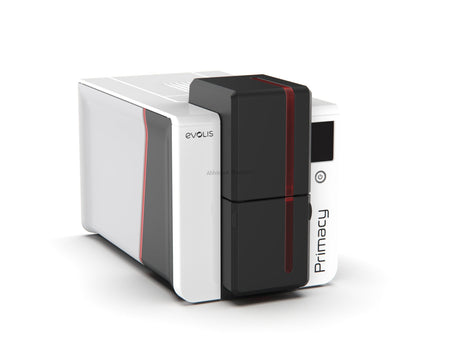
The Evolis Primacy 2 is the latest professional-grade ID card printer designed for high-quality PVC card production in India. This thermal technology printer supports a wide range of applications including driving licenses, attendance cards, and secure chip cards. By using the integrated Cardpresso XM software, businesses can design custom layouts with barcodes, photos, and signatures for immediate issuance.
TL;DR: Evolis Primacy 2 Quick Summary
The Evolis Primacy 2 is a versatile thermal ID card printer capable of printing on PVC, RF ID, and Mifare 1K cards with scratch-proof and water-resistant results. It features a unique printhead protection system and includes free Cardpresso XM software for professional card designing.
- Supports dual-sided printing for employee IDs and security badges.
- Includes a 100-card capacity input hopper for bulk printing.
- Utilizes YMCKO ribbons for full-color, durable thermal prints.
Before you start
Beginners should start by understanding the different types of cards available for the Evolis Primacy 2. Standard PVC cards come in two varieties: ordinary cards in 100-piece bundles and special variety cards in individual packaging. For security purposes, thermal chip cards are used for driving licenses, while RF ID cards are used for low-cost door access systems.
Proper maintenance of the printhead is critical for longevity. The Primacy 2 includes a unique printhead protection feature that prevents accidental damage when the cover is open. This mechanical lock ensures that even if you accidentally touch the head area during ribbon installation, the sensitive components remain protected.
Setup steps
Install driver or software
The Evolis Primacy 2 includes free Cardpresso XM software for professional card designing. This software allows you to import ready-made designs or create custom layouts from scratch.
Install ribbon
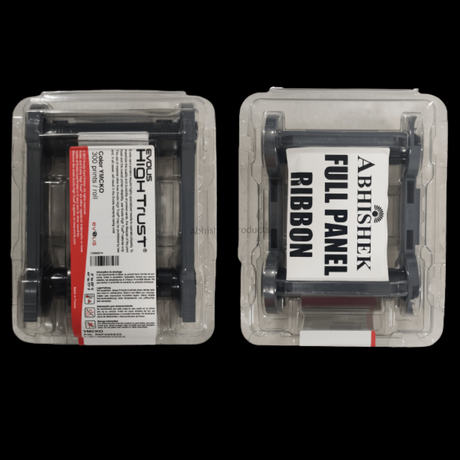
- Install the specialized EP-2 ribbon cassette by holding the clips and sliding the cassette into the printer.
- Ensure the RF ID chip on the ribbon is positioned on the right-hand side of the printer for proper recognition.
- The printer utilizes an RF ID chip on the ribbon to automatically detect the ribbon type and remaining capacity.
Load cards
- Place the cards in the input hopper, which can hold up to 100 cards at a time.
- The output hopper is located at the bottom of the printer, where the finished cards are collected.
Print first test card
- Open the Cardpresso software and select a template from the 62 free templates included.
- Double-click on any text element to change details like the shop name, discount percentage, or employee designation.
- Drag and drop photos directly into the card layout.
- Press Ctrl+P to send the command to the printer. The Primacy 2 will pull the card, apply the thermal print, and eject the finished product in seconds.
How to use the printer
The best way to use the Evolis Primacy 2 is by leveraging the Cardpresso XM software. You can easily add company names, employee photos, and digital signatures to your PVC card designs. For security applications, the printer is highly effective at encoding and printing on Mifare 1K cards and RF ID cards, which are commonly used in India for attendance machines and door unlock systems.
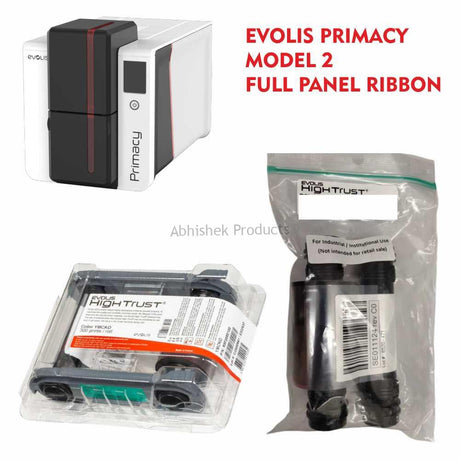
When printing high-resolution images, ensure you are using the Evolis Primacy 2️ YMCKO 300 Impressions Thermal Ribbon (Full Panel) - 1 Roll Colour Ribbon. This ribbon provides a full panel of color (Yellow, Magenta, Cyan, Black, and Overlay) to create sharp, photographic-quality prints on standard PVC cards.
The printer works using thermal transfer technology, where heat is applied to a ribbon to transfer ink onto a PVC card. The 'O' represents a clear overlay panel that protects the print from environmental wear and tear. For professional presentation, printed cards can be inserted into ATM pouches, available in both matt and glossy finishes.
To learn more about the technical differences between various printer models, you can read our guide on the BASIC OF PVC ID CARD PRINTER EVOLIS PRMACY, DATACARD SD360, ZEBRA ZXP3, ENDURO MAGIC CARD PRINTER.
Troubleshooting or common issues
- Card feed problem: If the printer detects an empty tray, the software will display a "card feed problem" alert on your computer screen.
- Mechanical alignment: Users should always use two hands to open and close the printer cover to ensure the mechanical components align correctly.
- Barcode integration: For more complex barcode needs, refer to our article on Mastering Custom Barcode Labels with BarTender Software.
Frequently Asked Questions
What types of cards can the Evolis Primacy 2 print?
The Evolis Primacy 2 can print on standard PVC cards, thermal chip cards (like driving licenses), Mifare 1K cards for attendance, and RF ID cards for security systems. It is compatible with both ordinary 100-piece bundle cards and premium individually packed PVC cards. The thermal technology ensures all prints are scratch-proof and water-resistant.
Is the Cardpresso software included for free?
Yes, Cardpresso XM software is provided free of cost with the Evolis Primacy 2 printer. This software allows users to perform basic and intermediate card designing, including adding photos, signatures, and barcodes. It also includes 62 free templates that can be customized for hospitals, schools, or corporate offices without needing advanced technical knowledge.
How do I know when to change the ribbon?
The printer and software provide real-time information about the ribbon status. The Cardpresso software displays the remaining ribbon percentage (e.g., 35% remaining) and identifies the specific ribbon model installed, such as YMCKO. This ensures you can monitor usage and prepare a replacement ribbon before the current one is completely exhausted.
What is the unique printhead protection feature?
The Evolis Primacy 2 features a mechanical printhead protection lock that is not available in many other printers. When the printer cover is opened, the printhead is shielded to prevent accidental damage from touch. This feature significantly extends the life of the printhead, which is the most sensitive and important part of the printer.
Can the Evolis Primacy 2 print on both sides of a card?
Yes, the Evolis Primacy 2 is designed to support double-sided printing. In the Cardpresso software, users can toggle between the "View Card Front" and "View Card Back" options to design both sides. The printer automatically handles the card flipping process to ensure a professional finish on both the front and back of the PVC card.
Are the printed cards durable for long-term use?
Cards printed with the Evolis Primacy 2 are highly durable and can be used for several years without damage. The thermal technology makes the print scratch-proof and resistant to water. Even if the card is bent, the printing does not peel or remove, making it ideal for employee IDs and membership cards that face daily wear.
Related products
- Evolis Primacy 2 Card Printer Full SETUP With 200 Dark Print Cards & Full Panel Ribbon/Ink + 📞Support & Installation
- Evolis Primacy 2️ YMCKO 300 Impressions Thermal Ribbon (Full Panel) - 1 Roll Colour Ribbon
- Evolis Primacy 1️ YMCKO 300 Impressions Thermal Ribbon (Full Panel) - 1 Roll Colour Ribbon
- For more information on ID card solutions, visit the AbhishekID.com homepage.